
Just for fun, I attempted to bruteforce my own WPA2 (“Wi-Fi Protected Access”) network using Elcomsoft Distributed Password Recovery. Since I had rather awful results in the past with *.PDFs, I thought, perhaps I would have better luck with WPA cracking. The PDF algorithm doesn’t work with GPUs, but it does work with WPA, so I thought that maybe I’d be in luck!
In order to bruteforce WPA/2, you have to capture a 4-way “handshake” (tutorial below). You can do this using BackTrack, or WireShark to listen and capture the packets to a file, specifically a *.CAP file. If you don’t capture it correctly, you won’t be able to even try cracking it. Not that this makes much of a difference…
So, is it possible to bruteforce a WPA/2 network? As it turns out, the answer to that is a resounding no. Shocked? The algorithm is so strong that the passwords-per-second that you can achieve in bruteforce are incredibly low. For example, I loaded the distributed agent on my Quad-Core (Q9450) system w/ just one NVIDIA GTX280, at full power it average just ~10,000 passwords per second. Even if I could double that to ~20,000 passwords per second, it wouldn’t even amount to a drop in the bucket. This would be more like a drop into the Hoover Dam.
Have a look at a tiny cluster of just7 systems (excluding the above-referenced rig), mostly CPUs (one GPU rig) w/ 11 cores going at it. All those systems combined produced a whopping 2,556 pw/s.
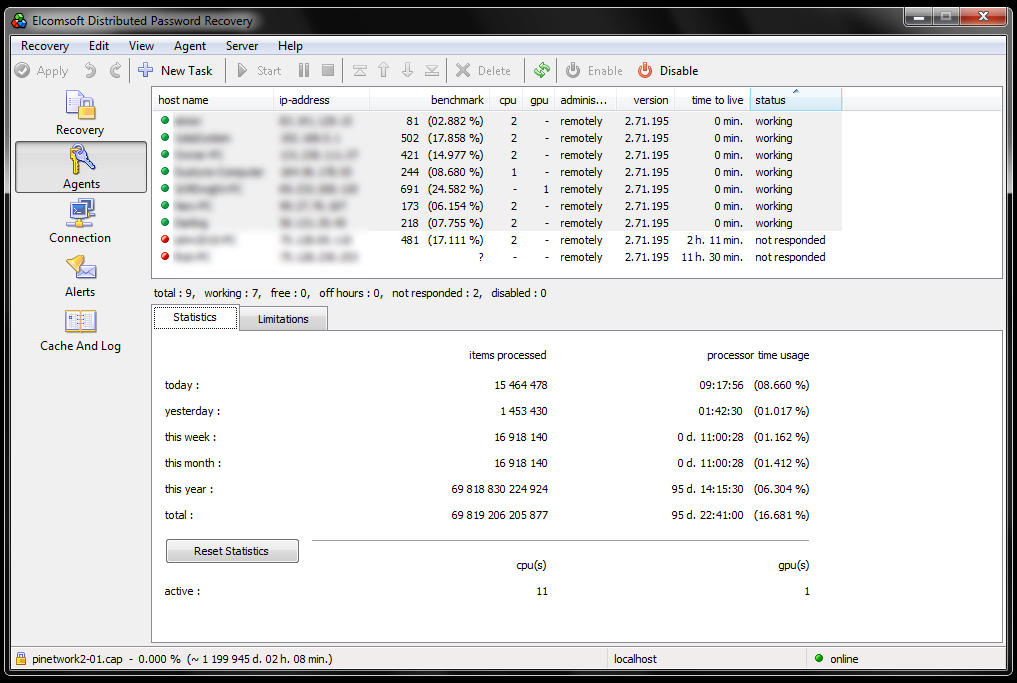
WPA/2 has a minimum password length of 8 characters, and for good reason. This length is just enough to make things impossible without serious power.
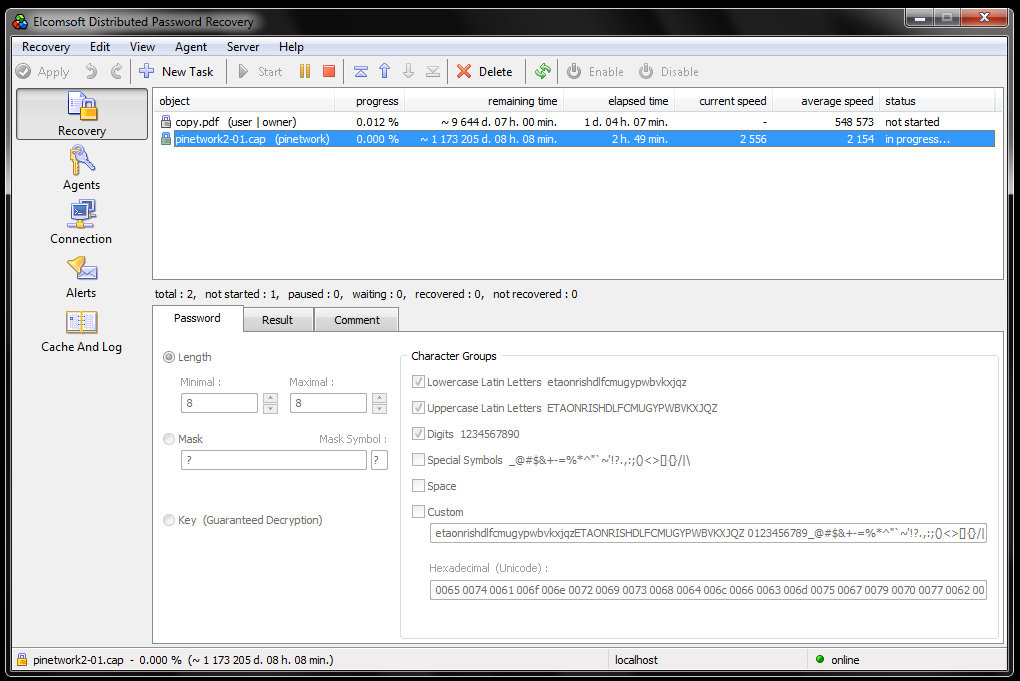
So, at 2,556 pw/s, you’re looking at ~1.1 million days to recover an 8-character password. Hey, that’s only ~3,013 years! But wait, there’s more. I only have uppercase and lowercase letters and numbers. What if they use a symbol or a space? Then it’s even worse! Or, what if it’s a 9, 10, or 20 character password? Forget about it. Moreover, if someone has an irregular SSID. you won’t be able to run a rainbow table attack on it.
If, however, you somehow get control of all the current GPU power of Bitcoin… then maybe you could successfully bruteforce my WPA/2 network, anything short of that, you’re out of luck.
Forgive my sarcasm, I just cannot wrap my mind around why this is even offered as an option in this software. Under what circumstances would it ever be possible? OK, I suppose if you knew some of the characters of the password, you could mask off the known characters and bruteforce the rest. In that instance, it could be a useful tool.
But hey, if you really don’t believe me, and want to give it a try yourself, here’s what you need to do:
– Download a BackTrack ISO (“BT”) and burn it to a disc (or use a VM if you know what you’re doing). (Note: different versions behave…differently. I found that, for example, BackTrack 3 worked with a certain wireless card of mine while BT4 did not recognize the same card. So, if you find that you have trouble with one version of BT, try out another before giving up. It is a really tremendously valuable distribution.)
– Boot up BT and open a terminal (command-line prompt).
-Type iwconfig to determine your wireless card interface name. (For example, “eth1” or “wlan0”). If nothing shows up, then BT did not detect it, and you’ll have to do a lot of Googling to figure it out, or try another version of BT.
– Type airmon-ng start wlan0
– This will enable monitor mode on your wireless interface.
– It should be called mon0. So, go ahead and type: airodump-ng mon0
– From the list of wireless APs (Access Points), take note of the channel, ESSID and BSSID.
– Type airodump-ng -c [channel] -w [ESSID] –output-format ivs mon0
– The [ESSID] will be the filename. Note: don’t type the [brackets] themselves, just enter the data directly in. (As an example: airodump-ng -c 6 -w VGHzNetwork…)
– Open a new console.
– Type aireplay-ng -0 1 -e [BSSID] mon0
– This performs a deauthentication (“deauth”) — in order to acquire a 4-way handshake, someone needs to connect to the network. Since most computers automatically reconnect when the connection is interrupted, we use this command to kick them off. Note: You may need to do this several times, at different intervals. Depending on the router and devices connected, it can be tough to get the handshake. So, be patient. If no one is home, and no devices are connected… you can’t get the handshake no matter what you do. Someone must connect successfully.
– So, keep an eye on the previous console window and look for the words “WPA Handshake” to appear in the upper right corner. Once you see it, you can stop the console window (with Ctrl+C). The aireplay-ng window can then be closed as well since the handshake has been acquired.
– Type aircrack-ng -w list.lst [ESSID]
– Note: Remember the filename you specified earlier on. It will be a *.ivs file. Example: ESSID-01.ivs; type ls to locate it if you don’t know the name.
– You can use this file with ESDPR, or you can use the built-in dictionary attacker w/ aircrack-ng. You’ll want to use a pretty beefy dictionary — and it will likely fail, unless someone has a weak password consisting of something matching your dictionary. If you go this route, you’ll likely need a much larger dictionary than the one provided with BT.
admin@variableghz.com
A Radeon HD 6990 can do over 100,000 pw/s so 10 systems each with x2 6990’s could do a distributed attack in less than a month. idk who would have the time and resources to pull off such an attack but it’s definitely do-able.
Ken,
It depends on the algorithm used to perform the encryption. PDFs have a much more complex algorithm than, say, ZIP files do. So, you might be able to achieve 100k pw/s with a ZIP file, but I seriously doubt it with a WPA capture file, or a PDF.
Latest VGA card by Nvidia (GTX 690), got alot of Cuda Cores 4000+, so that plus 10 other rigs with the same setup can crack Brute force WPA2 in days.
The only thing that is accomplished by Zed’s comment is a distribution of stupid. Individuals like this show their ignorance by reporting what they have been told versus what they have proved.
Hackers live to find such idiots and exploit them. This is the kind of moron who probably uses a birthday, an anniversary, his middle name, “password”, a phone number, or his IQ of 2 for the securing his network. Yeah he can get hacked in under 2 minutes. So Zed stop working for the Geek Squad and get some real talent – till then keep you ignorant rants of profanity to yourself.
P.S. If you do get hacked – then who was the unobservant moron who couldn’t figure that the someone within 1500 feet took him down? Stop looking at porn and look out the window once in a while!